How to Use TweetDeck As a Brand Monitoring Platform For Twitter |
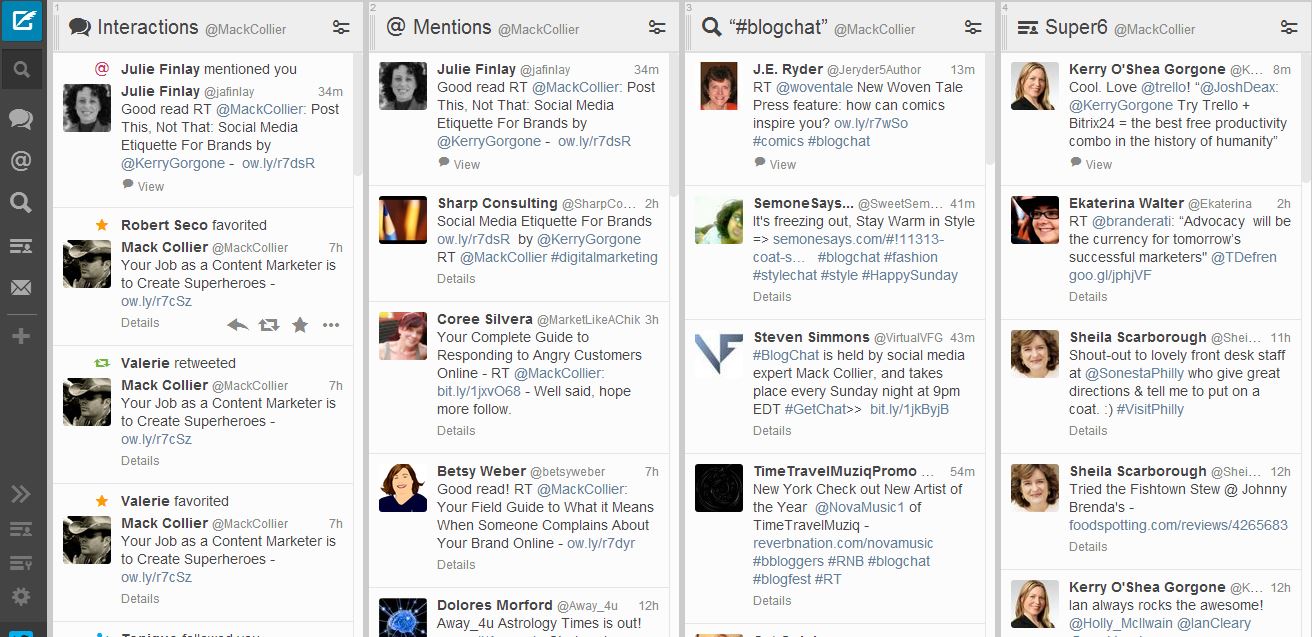
| How to Use TweetDeck As a Brand Monitoring Platform For Twitter Posted: 25 Nov 2013 06:00 AM PST It’s deceptively easy to monitor your brand and industry mentions online. Sure, you can do some amazingly sophisticated and valuable breakdowns with expensive monitoring suites, but for the average brand a lot of their basic monitoring needs can be covered by free tools. In this post I wanted to walk you through how you can do some very simple brand monitoring on Twitter with TweetDeck for Chrome. Before we talk about using these tools, let’s backup and talk some basic monitoring for your brand on Twitter. First, what exactly should you be monitoring? Start with brand mentions. Make sure you are aware of what’s being said about your brand and also who is saying it. You want to know what’s the conversation around your brand and who is driving it. From there, you should also monitor industry mentions. You want to be able to keep up with what’s happening in your industry and also what your competitors are up to. You can literally extend this and monitor brand mentions for your competitors. It can give you a quick and easy way to see how your competitors respond to customers on Twitter or even if they respond. Now based on your resources, at this point you can also break it down further and monitor mentions of specific product lines or key executives within your company. Or another example would be if your company has a major product reveal at an upcoming industry event, you could monitor the hashtag for that event and then track reaction to the reveal in real-time! Now I want to show you how I do this with TweetDeck for Chrome: There’s four columns showing” 1 – Interactions: This shows me replies as well as when someone retweets me or favorites one of my tweets. It also shows me when someone follows me or adds me to a list. 2 – Mentions: This shows me replies as well as retweets. A bit of redundancy here, so if you want to create several columns you could probably go with just Interactions. Pro Tip: You could also make a search term for your user name (ie mine would be ‘mackcollier’) and that would show you your replies as well as tweets you have left. 3 – #Blogchat tweets: This column is for a search I am doing for the #Blogchat hashtag. I typically use TweetDeck for Chrome to participate in #Blogchat. You can use this for search term you want. 4 – Super6: This is a private List I have created of a few marketing/social media pros that I follow because I know they create and share awesome content. These tweets help me stay up to date on what’s happening in my space, and it also helps me find valuable content to share with others. Twitter Lists are a very powerful tool for your social media marketing toolbelt and I’ll talk more about them here tomorrow. But what’s great about TweetDeck is that it also gives you a very simple way to not only monitor for your brand, but to distribute information found and share it with your team.
Now I want to stress that obviously TweetDeck has some severe limitations in functionality and features that it can offer you. And a lot of this can also be accomplished by using similar tools such as HootSuite. The point I wanted to make with this post was to show you that social media monitoring doesn’t have to be complicated. And even if your brand isn’t getting thousands of mentions a day and can’t afford (or need) a robust social media monitoring suite like Radian6 or Sysomos doesn’t mean that you shouldn’t be monitoring. I’d much rather you dip your toes in the waters and try some of this stuff for yourself vs just think ‘oh social media monitoring is something only big companies need to worry about’. If anyone is online taking about your brand and/or your industry, then you need to know what they are saying, period.       |
| You are subscribed to email updates from MackCollier.com - Social Media Training and Consulting To stop receiving these emails, you may unsubscribe now. | Email delivery powered by Google |
| Google Inc., 20 West Kinzie, Chicago IL USA 60610 | |


0 comments:
Post a Comment